Ingest definitions
An ingest definition brings data into the Lakehouse. Its data sets are the tables producers send files to, and its materialized views are tables the Lakehouse computes from them, each with a function. Data products publish them in their access points. Here, FirmIngest brings the firm database's two tables into the Lakehouse, as the data sets FIRM and PERSON, and computes two views of them: FIRM_EMPLOYEES, each person with their firm's name, and EMPLOYEES_BY_FIRM, how many people each firm employs.
Legend Studio shows an ingest definition read-only. A view is built and changed in Legend Cube, and everything else is written in text mode.
Overview
The editor opens on the definition's Overview: the definition first, then its materialized views and data sets.
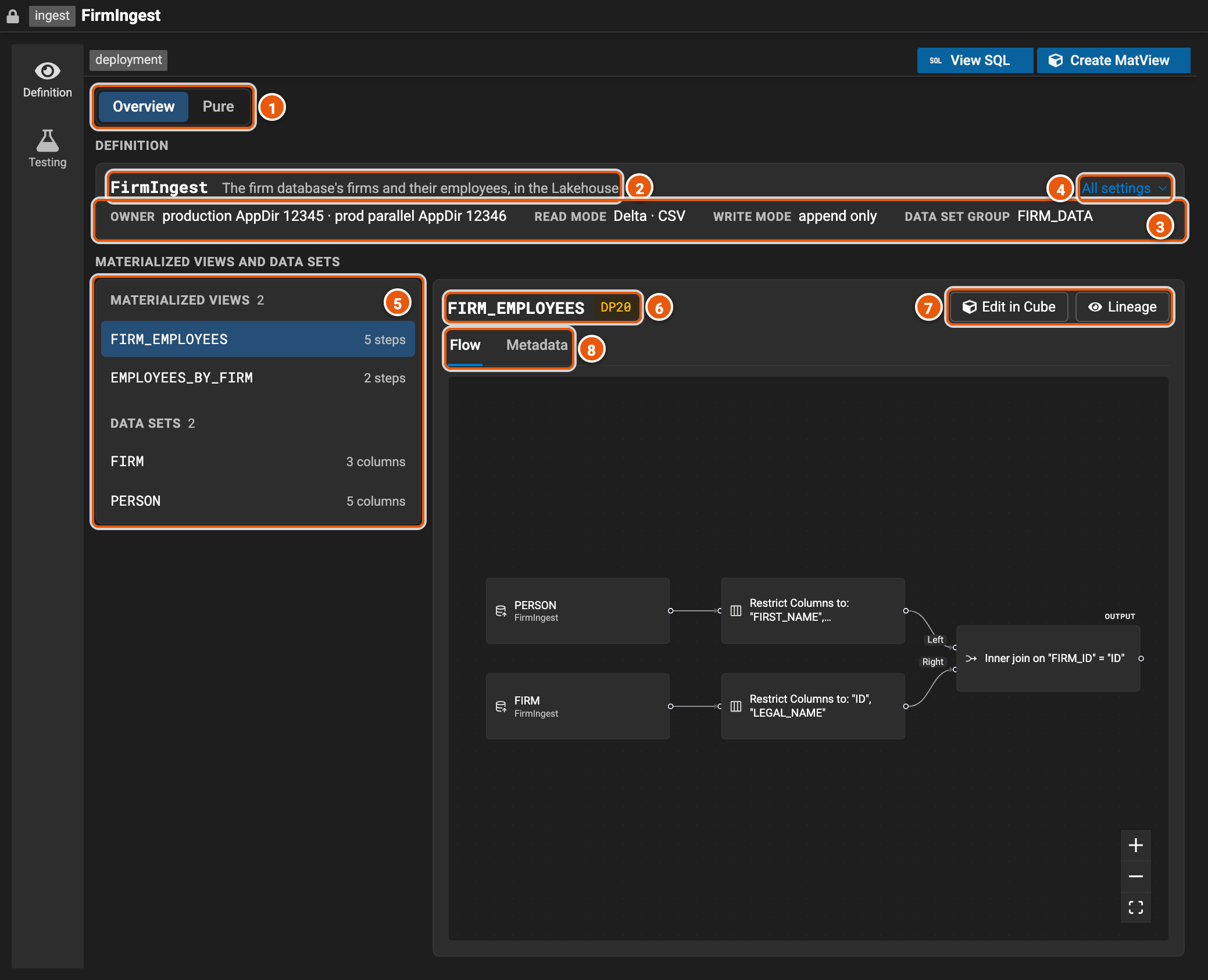
- Overview and Pure: Pure shows the whole definition in the Legend language instead.
- The definition: its name and its doc.
- Its main settings, which every data set follows unless it sets its own: Owner, the deployments that own it; Read mode, how it reads the files it is sent, and their format; Write mode, how it writes them; and Data set group. A definition that names its compute shows it here too.
- All settings opens the definition's other settings (see All settings).
- Its materialized views, each with its number of steps, then its data sets, each with its number of columns. Click one to show it on the right.
- The view: its name and the classification of its data.
- Edit in Cube opens the view in Legend Cube, to change it. Lineage shows where its columns' data comes from.
- Flow shows the view's function as Legend Cube draws it, read-only: here, the people's names and firm, joined to each firm's name. Metadata shows the rest of what the view says: its key, its classification, the data sets it reads (under Reads), and how it is written and stored. A view Legend Cube can't draw yet says why, and shows its function in the Legend language instead.
Above the Overview, Create MatView builds a new view in Legend Cube, from the project's data sets (see Building a view in Legend Cube). View SQL shows what the engine generates for the views: each view's columns and its SQL. On Pure, the header also has Lineage, for the first view, and the arrow beside Create MatView opens any view in Legend Cube.
All settings
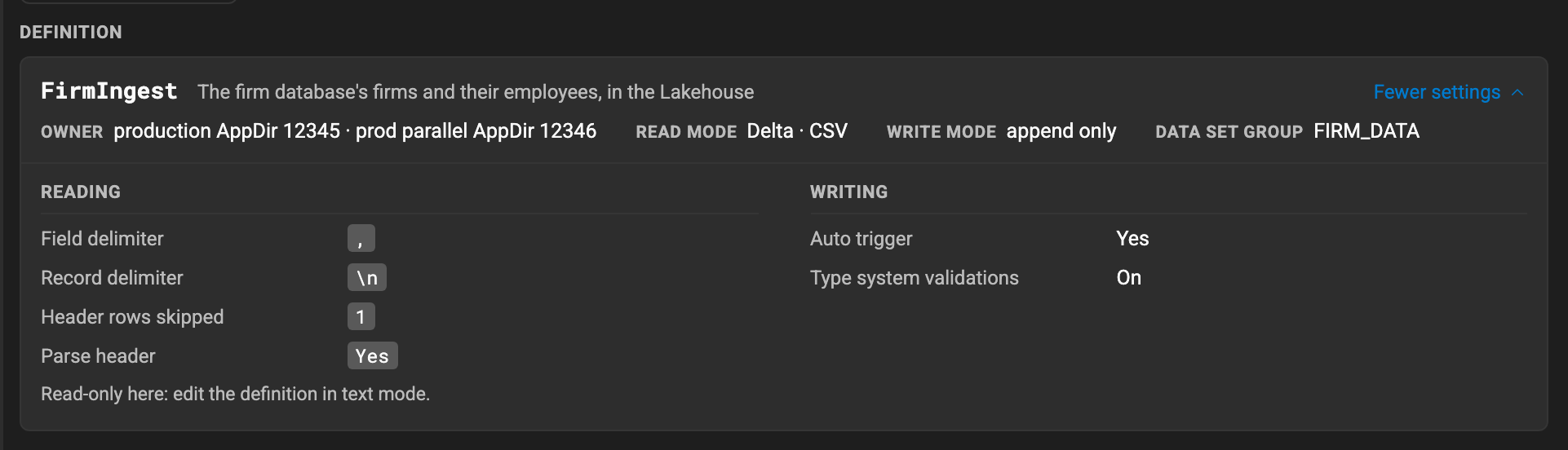
All settings opens the definition's other settings below its main ones, in groups: who runs it, the options of its files' format (here, the CSV files' delimiters and header), how it writes, its batches, and its annotations. A group the definition sets nothing in isn't shown. Fewer settings closes them.
Data sets
Click a data set to show it. Schema shows its columns, and Metadata the rest of what it says. The tab stays as you click another data set, so you can compare them.
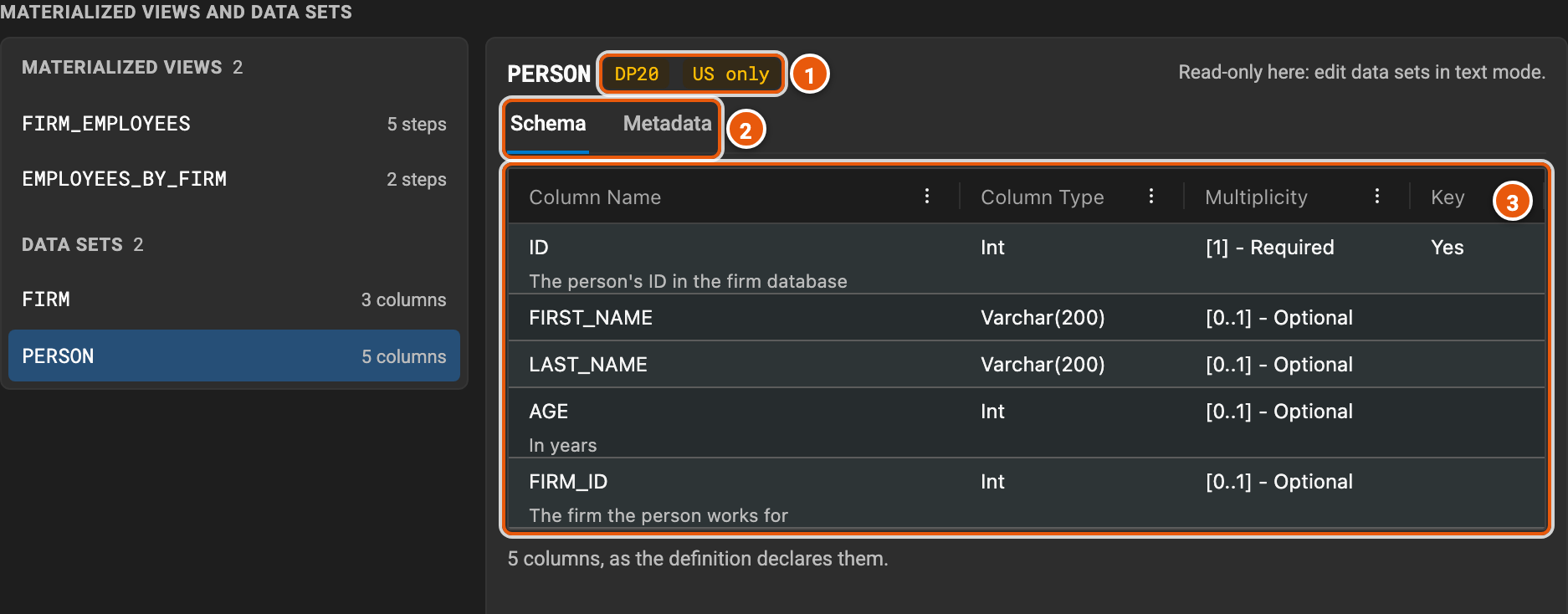
- The classification of its data, and where the data must stay: here, in the US.
- Schema and Metadata.
- Its columns: their names, their types, how many values each holds, and whether it is in the data set's key. A
column's documentation, its
doc.doctagged value, shows under its name. The columns its write mode adds, such as a batch milestoned data set's LAKE_IN_ID and LAKE_OUT_ID, come last, greyed out.
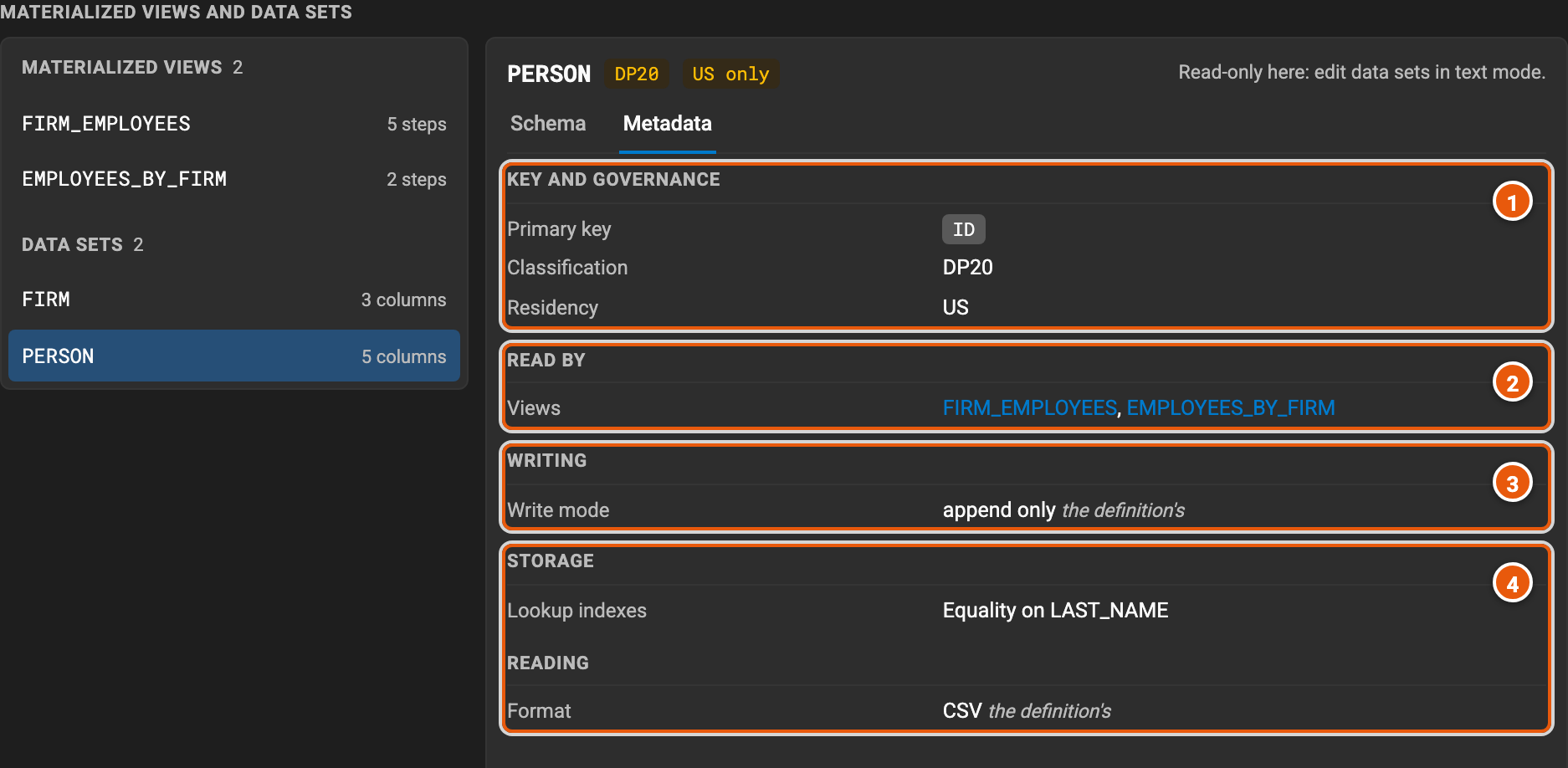
- Key and governance: its primary key, its classification and its residency.
- Read by: the views that read it. Click one to show it.
- Writing: its write mode, and, where it says so, which rows count as deleted. A setting it takes from the definition says the definition's; one it sets itself says its own.
- Storage: how it is partitioned and clustered, and its lookup indexes. Reading: its files' format, and the steps that clean them before they are written.
A definition with no materialized views opens on its Overview too, on its first data set. Create MatView builds its first view.
Building a view in Legend Cube
Create MatView opens Legend Cube on the project's data sets, to build a new view, and a view's Edit in Cube opens its function, to change it. The step that runs becomes the view:
- Add MatView asks for the new view's name, the classification of its data and its primary key, among the step's columns, then adds it to the definition.
- Save MatView puts the step in place of the view's function. It asks again only for what the view can't be saved with as it was: the classification of its data, or a primary key whose column is gone.
- × closes Legend Cube, adding or saving nothing.
A view can read a data set's batch metadata instead of its rows: a row for each batch the data set was sent in, with its
status, its times and its statistics. In the Legend language, it reads #I{…|metadata}#. To start one, add an ingest
data set in Legend Cube and, above its data sets, set Read to Batch metadata. Every data set has batch metadata,
a materialized view too. Its first step is named after the data set, e.g. FIRM metadata, in its flow and in Legend
Cube, and Save MatView keeps it reading the batch metadata.
An incremental view reads the data set's incoming rows instead: those it has not read yet, #I{…|incoming}# or
#I{…|incomingMilestoned}#. Legend Cube opens such a view, names its first step after the data set and what it reads,
e.g. FIRM incoming, and Save MatView keeps it. The data set's incoming rows have the columns of its append
log, such as LAKE_BATCH_ID. Legend Cube does not start an incremental view yet: write it in Pure.
The Legend Cube guide explains Legend Cube's steps.