Join Another Input
Joins two inputs on pairs of columns.
Here it joins each sale to the order with the same id, keeping the sales without one. The cube runs on the sample sales (country, product, year, amount and price; the example "Sales by country and year").
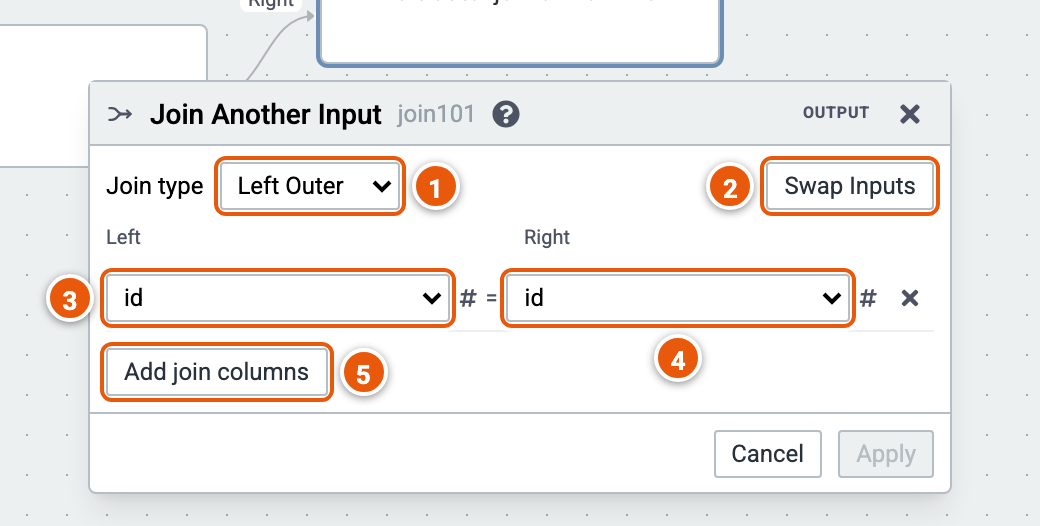
- Join type: Inner, Left Outer, Right Outer or Full Outer.
- Swap Inputs: the Left and Right inputs change places; the join columns follow them.
- The Left input's column.
- The Right input's column, whose value must equal the left one's.
- Add join columns: another pair; rows match when every pair does.
Picking the other input
Right-click a step and hover Join Another Input: it lists the other steps on the canvas the Join can take as its Right input, the last step of each other chain. Picking one adds the Join with that step on the Right. A click on Join Another Input itself adds the Join alone; its editor then asks for the Right input.
Suggested join columns
The editor suggests join columns, strongest first:
- a join the database defines between the tables the two inputs' columns come from, even through other steps, such as a Rename;
- a table's primary key that the other input names alike;
- a column named after the other input's table and its
ID, such asCUSTOMER_IDagainst theIDofCUSTOMERS; - a column both inputs name alike.
Use takes a suggestion. The column lists show the suggested columns first. When a new Join gets its second input and one suggestion is clearly the join (the only database join, else the only primary key or key-like column both inputs name alike), the Join takes it: change it as you like.